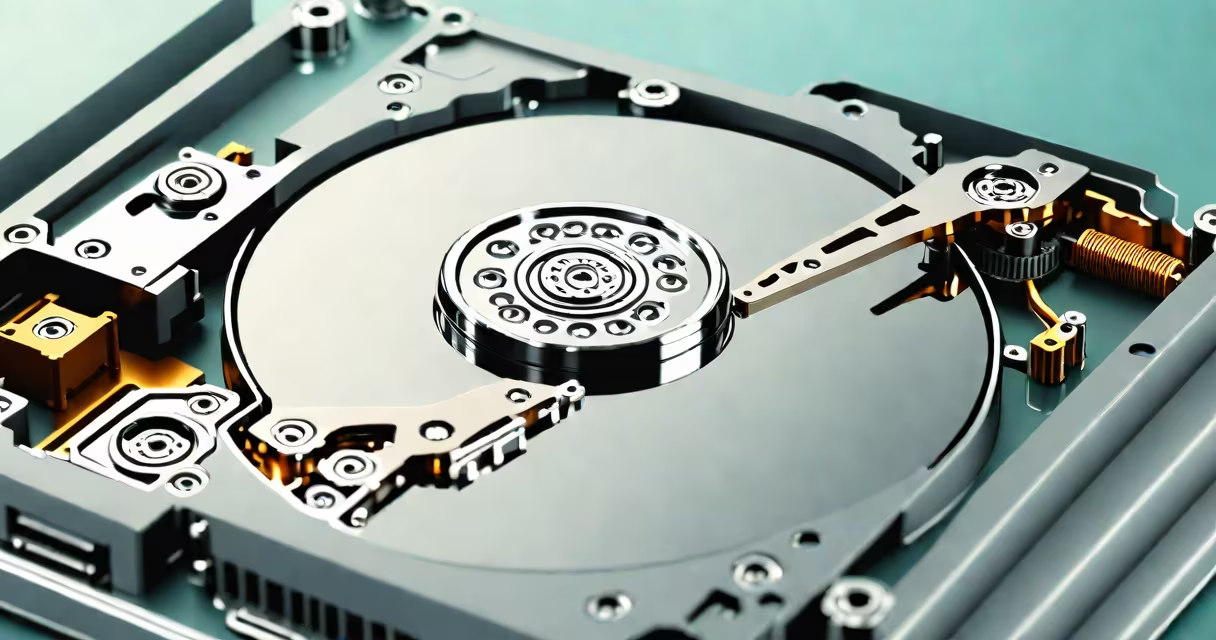
An open disk drive is a mechanical storage device inside a computer that accesses data stored on rotating magnetic platters. It reads and writes information through a movable arm with a read/write head positioned above the spinning disk surface.
When a computer requests data, the open disk drive spins the platter at high speed-typically 5,400 to 15,000 RPM-and moves the read/write head to the correct track. The head detects tiny magnetic fields representing binary data, converting them into electrical signals the system can process.
This mechanism forms the core of traditional hard disk drives (HDDs), which remain widely used in desktops, servers, and external backup systems due to their high capacity and low cost per gigabyte.
The open disk drive operates using precise mechanical and electromagnetic principles. A motor spins the platters at constant speed while a servo-controlled actuator arm positions the read/write head over specific tracks. Each track is divided into sectors, typically 512 bytes each, storing individual data blocks.
For example, when you open a 10 MB video file, the operating system sends a request to the disk controller. The drive locates the file's starting sector, waits for the platter to rotate so the correct data aligns under the head, then begins reading sequentially until the entire file is transferred.
Modern drives use advanced techniques like zone bit recording, where outer tracks store more data than inner ones because they have longer circumferences. This increases storage efficiency without requiring larger platters.
Open disk drives fall into two primary categories based on interface and form factor:
| Type | Interface | Typical Use | Speed Range |
|---|---|---|---|
| Internal HDD | SATA III, SAS | Desktops, servers, workstations | 100-200 MB/s |
| External HDD | USB 3.0/3.1, Thunderbolt | Backup, portable storage | 80-250 MB/s |
| Legacy IDE/PATA | IDE connector | Older systems, retro builds | 10-137 MB/s |
Inside the drive, components include the spindle motor, platters coated with ferromagnetic material, the actuator arm, and the head assembly. The head floats nanometers above the surface-too close to touch, yet stable enough to avoid contact during operation.
A critical but often overlooked detail: the drive's air filter prevents dust particles from entering. Even a single speck can cause a head crash, where the read/write head touches the platter and damages the data layer. This is why opening a working HDD externally is dangerous and strongly discouraged.
Many users confuse open disk drives with solid-state drives (SSDs), which have no moving parts. SSDs use flash memory chips and offer faster access times, lower power consumption, and better durability. However, HDDs still dominate in long-term, high-capacity storage due to cost advantages.
Another frequent mix-up is equating "open disk drive" with "optical drive." Optical drives (CD/DVD/Blu-ray readers) use lasers to read data from reflective surfaces. They are not magnetic and do not contain spinning platters. While both may be labeled "drive," they serve entirely different purposes and technologies.
Some assume that opening a disk drive allows data recovery from a failed unit. In reality, attempting to open a sealed HDD risks permanent data loss. Dust, static electricity, and physical damage to the platters make DIY repairs ineffective and often destructive. Professional data recovery services use cleanrooms and specialized tools-not household tools.
In 2019, I replaced a failing 1 TB HDD in a media server that stored 15 years of family videos. The drive had developed bad sectors, causing playback errors. After backing up available data via a USB-to-SATA adapter, I installed a new drive.
I used a tool called smartctl (from the smartmontools package) to check the drive's S.M.A.R.T. status before replacement. The report showed a high raw read error count and reallocated sector count-clear signs of impending failure. Replacing the drive prevented data loss.
After installation, I ran a full surface scan using badblocks to verify integrity. The new drive reported zero errors across 100% of the test area. This confirmed that replacing the open disk drive was necessary and effective.
Open disk drives are essential for large-scale data storage and retrieval in computing systems. Their mechanical design enables affordable, high-capacity storage but introduces vulnerability to physical shock and environmental factors.
Understanding the difference between HDDs and SSDs, and knowing not to open a sealed drive, prevents costly mistakes. Always back up data regularly and monitor drive health using diagnostic tools.
While newer systems favor SSDs for performance, open disk drives remain important in enterprise environments, home servers, and legacy infrastructure. Their reliability, when maintained properly, ensures decades of service.